










The best budget mechanical keyboard for most gamers in 2026 is the Redragon K552: a tenkeyless board with a metal top plate for about $30–35. If you want something more compact and wireless, the Royal Kludge RK61 (about $40–50) is the pick, and the Aula WIN60 HE (about $40) brings the new magnetic switches to a budget price.
Here's the short version:
- Best overall: Redragon K552, ~$30–35. Tenkeyless, metal plate, wired.
- Best compact wireless: Royal Kludge RK61, ~$40–50. 60% layout, hot-swap sockets.
- Best for typing and gaming: Keychron C3 Pro, ~$44. Tenkeyless, wired.
- Best for competitive shooters: Aula WIN60 HE, ~$40. Magnetic (Hall effect) switches with adjustable actuation.
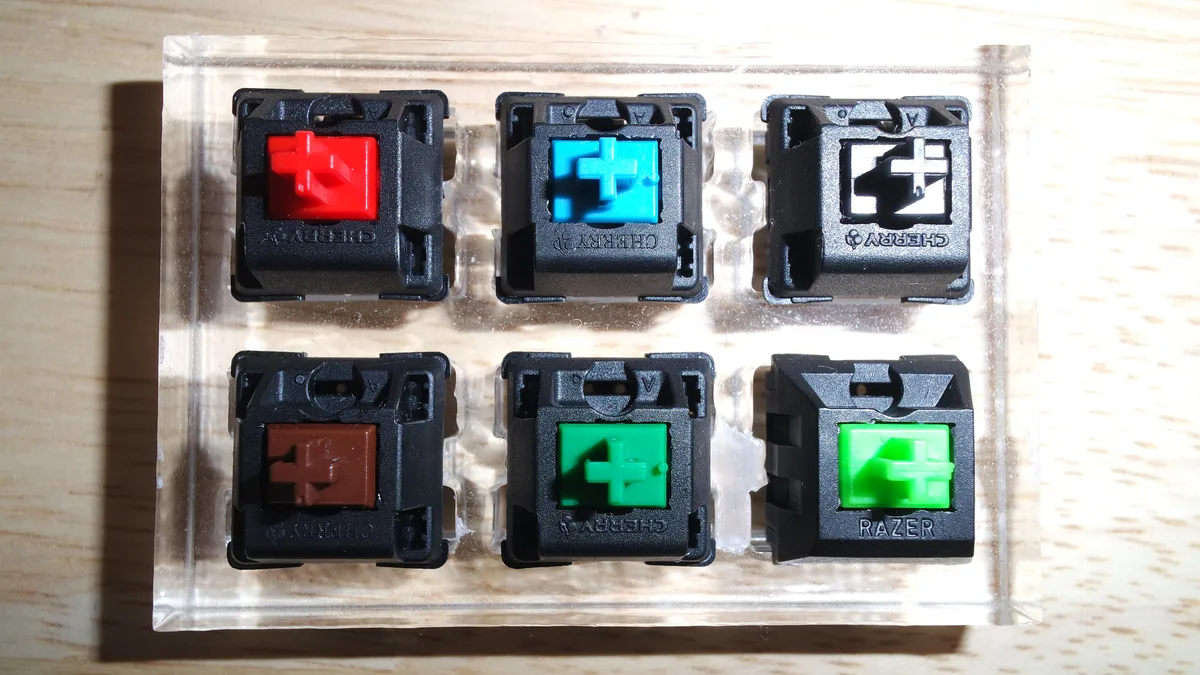
- Switches: linear (red) for gaming, tactile (brown) for mixed use, clicky (blue) only if no one sits near you.
What to look for in a budget mechanical keyboard
Layout first, then switches. At this price, build quality is decent across the board, so the choice comes down to how big the keyboard is and how the keys feel.
Layout:
- Full size: includes the number pad. Rare in this group; mostly useful for spreadsheets.
- Tenkeyless (TKL): no number pad. More room for your mouse, still has arrow and function keys.
- 75% / 65%: smaller still, keeping arrow keys.
- 60%: the smallest. No arrow keys or F-row without a function layer; great for desk space, harder for everyday typing.
Switches:
- Linear (often red): smooth, quiet-ish, no bump. The usual pick for gaming.
- Tactile (often brown): a small bump when the key registers. A good middle ground for gaming and typing.
- Clicky (often blue): a bump plus a loud click. Fun to type on, annoying on voice chat.
- Magnetic / Hall effect: a newer type that lets you set how deep a press registers, and "rapid trigger" for faster repeated presses. Useful in competitive shooters.
The 4 best budget mechanical keyboards
| Keyboard | Typical price | Layout | Connection | Standout feature |
|---|---|---|---|---|
| Redragon K552 | ~$30–35 | Tenkeyless | Wired | Metal top plate, best value |
| Royal Kludge RK61 | ~$40–50 | 60% | Wireless + wired | Hot-swap sockets |
| Keychron C3 Pro | ~$44 | Tenkeyless | Wired | Typing feel, software support |
| Aula WIN60 HE | ~$40 | 60% | Wired | Magnetic (Hall effect) switches |
Prices are from 2026 budget keyboard roundups; all four go on sale often.
Redragon K552: the best budget mechanical keyboard
Worth it if you want a sturdy, no-fuss keyboard for the least money. Skip it if you want wireless or a very small layout.
The K552 has been the default budget mechanical keyboard for years. It's tenkeyless, so it leaves room for your mouse, and its metal top plate makes it feel more solid than its price suggests. It's wired and uses Outemu switches, a common budget switch brand. For about $30–35, it's hard to beat.
Royal Kludge RK61: the best compact wireless pick
Worth it if desk space is tight or you want wireless. Skip it if you use arrow keys a lot: on a 60% board, they live behind a function key.
The RK61 is a 60% keyboard with wireless and wired modes and hot-swap sockets, which means you can change the switches later without soldering. That makes it a good first keyboard if you think you'll get into the hobby. It sells for about $40–50.
Keychron C3 Pro: the best for typing and gaming
Worth it if you type a lot as well as game. Skip it if you want wireless.
Keychron is known for keyboards that feel good to type on, and the C3 Pro brings that to a wired tenkeyless board at around $44. It's the most "office-friendly" pick here while still being a solid gaming keyboard.
Aula WIN60 HE: magnetic switches on a budget
Worth it if you play competitive shooters like Valorant or CS2. Skip it if you mostly type or play slower games.
Magnetic (Hall effect) keyboards used to cost well over $100. The Aula WIN60 HE brings the feature to about $40: you can set how far a key travels before it registers, and use rapid trigger, which resets a key as soon as you begin lifting it. In shooters, that helps with quick strafing. It's a 60% layout, so expect a learning curve.
Do you need a mechanical keyboard for gaming?
No. A mechanical keyboard is nicer to use and lasts long, but it has the smallest effect on how well you play of any peripheral. If your budget is tight, a good mouse and headset come first. My guide to the best budget gaming peripherals puts the whole setup in order.
The bottom line
For most gamers, the Redragon K552 at about $30–35 is the budget mechanical keyboard to get: tenkeyless, solid and cheap. Go with the Royal Kludge RK61 for a compact wireless board you can customize later, the Keychron C3 Pro if you type a lot, or the Aula WIN60 HE if you play competitive shooters and want magnetic switches.
FAQ
What is the best budget mechanical keyboard?
The Redragon K552 for most people: tenkeyless, metal top plate and about $30–35.
Which switches are best for gaming?
Linear switches (usually red) are the most common gaming choice. Tactile (brown) suits mixed gaming and typing. Magnetic switches add adjustable actuation and rapid trigger for shooters.
What is a 60% keyboard?
A compact keyboard without the number pad, arrow keys or function row; those are reached through a function key. It saves desk space for your mouse.
Are hot-swap sockets worth it?
If you think you'll want to try other switches later, yes: you can change them without soldering.
Sources
- Best mechanical keyboard under $50 in 2026 — Setup Insider
- 10 best budget mechanical keyboards under $50 (2026) — NewsSerp (Redragon K552, Royal Kludge RK61 prices)
- Best mechanical keyboard by budget (2026) — WASDLife
- Best mechanical keyboard under $50 in 2026 — GameVexo (Keychron C3 Pro, Aula WIN60 HE)